Build and Deploy a Worker Node With AWS Node Runners
What You'll Learn
- How to deploy worker nodes using AWS Node Runners for production scale
- Understanding AWS infrastructure architecture for Allora workers
- Leveraging AWS Activate credits for startup-friendly deployment costs
Overview
Welcome to the AWS Node Runners documentation! This page provides detailed instructions on how to leverage Node Runners on AWS, including benefits, setup instructions, and useful links.
What are AWS Node Runners?
Node Runners on AWS enables you to deploy and manage blockchain nodes efficiently using AWS infrastructure. Whether you're deploying Ethereum nodes or other blockchain networks, Node Runners simplifies the process, offering scalability, reliability, and cost-effectiveness.
Why Use AWS Node Runners?
AWS Node Runners provide:
- Scalability: Automatically scale resources based on demand
- Reliability: AWS's high availability and uptime guarantees
- Cost-effectiveness: Pay-as-you-use pricing with potential startup credits
- Enterprise features: Professional-grade infrastructure and support
For more detailed information and step-by-step guides, please refer to the AWS Node Runners Documentation (opens in a new tab).
Architecture Overview
Allora Network's AWS Infrastructure
This diagram illustrates the architecture of the integration between the Allora Network (built on a Cosmos AppChain) and an AWS-based infrastructure for handling inference requests.
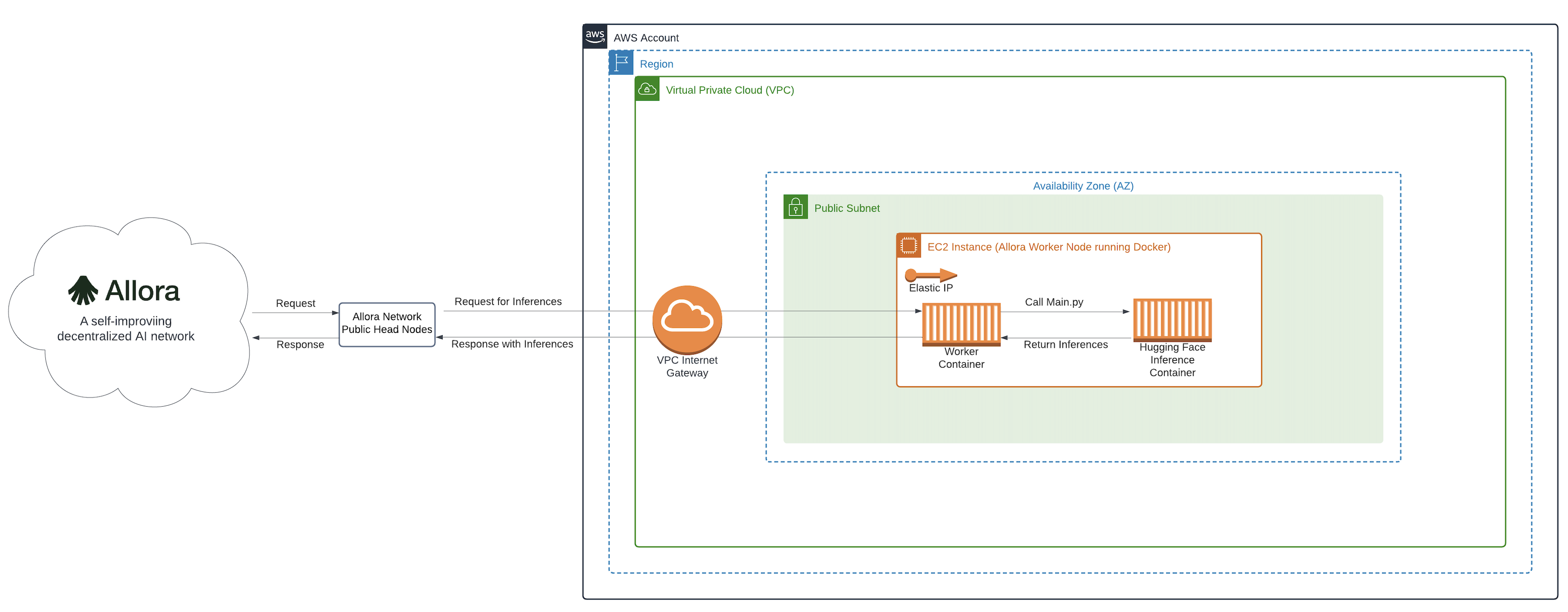
Key Components
1. Allora Network (Cosmos AppChain)
- Public Head Node: Acts as the entry point for the Allora Network, handling requests and responses.
2. AWS Account Setup
- Region: The geographical location within AWS where the resources are deployed.
- Virtual Private Cloud (VPC): Provides an isolated network environment within the AWS region.
- Public Subnet: A subnet within the VPC that has access to the internet through the VPC Internet Gateway.
- VPC Internet Gateway: Allows communication between the instances in the VPC and the internet.
3. EC2 Instance (Allora Worker Node)
- Offchain Node: This component handles network communication, receiving requests from the Allora Network and sending responses back.
- Node Function: Processes requests by interfacing with the private model server. It acts as an intermediary, ensuring the requests are correctly formatted and the responses are appropriately handled.
- Model Server: Hosts the proprietary model. It executes the main inference script (
Main.py) to generate inferences based on the received requests.
Process Flow
1. Request Flow:
- The Allora Network's Public Head Node sends a request for inferences to the EC2 instance within the AWS environment.
- The request passes through the VPC Internet Gateway and reaches the Offchain node in the public subnet.
- The Offchain node forwards the request to the Node Function.
- The Node Function calls
Main.pyon the Model Server to generate the required inferences.
2. Response Flow:
- The Model Server processes the request and returns the inferences to the Node Function.
- The Node Function sends the inferences back to the Offchain node.
- The Offchain node communicates the inferences back to the Allora Network via the VPC Internet Gateway.
AWS Activate Program
Important Notice
Before proceeding, please note that eligibility for AWS Activate credits and terms are governed by AWS. This documentation may become outdated, so ensure you refer to the AWS Activate program page (opens in a new tab) for the latest eligibility requirements and instructions.
AWS Activate Step-by-Step Process
To receive up to $5,000 in AWS Activate credits, follow these steps:
Step 1: Application
- Fill out our Typeform (opens in a new tab): Provide your details to receive our Activate Provider Organizational ID.
- Name (required)
- Contact Information (optional): Email, Telegram, Discord handle, LinkedIn
- Official Company Website (required)
Step 2: AWS Activate Application 2. AWS Activate High-Level Instructions: After obtaining our Organizational ID,
- Visit AWS Activate Credit Packages (opens in a new tab).
- Apply through the Activate Portfolio
Program Benefits
The AWS Activate program offers:
- Up to $5,000 in AWS credits: Significant cost savings for startups
- Technical support: Access to AWS technical guidance and best practices
- Training resources: Educational materials and certification opportunities
Prerequisites
- AWS account with appropriate permissions
- Basic understanding of AWS services (EC2, VPC, CloudFormation)
- Experience with blockchain node deployment concepts
- Familiarity with worker deployment basics
Next Steps
- Detailed Implementation: Refer to the AWS Node Runners Documentation (opens in a new tab) for complete setup instructions
- Alternative Methods: Compare with Docker deployment approach
- Model Development: Explore Allora MDK for specialized use cases